

School IT refreshes do not creep along. They happen in a week.
The new devices arrive in August, and the old ones come off the trolleys. Everything has to work on the first morning of term. There is no window afterwards.
Which is why the old fleet so often sits stacked in a corridor until Christmas. Four hundred sets of pupil data, still on it.
Why education is a harder version of this job
Every organisation refreshes devices. Schools do it under constraints most businesses never face.
The window is short and immovable. A holiday, not a quarter.
The estate is spread out. Trolleys, classrooms, departmental cupboards and the odd device in a staff room.
The data is sensitive. Pupil records, safeguarding material and staff information on the same fleet.
Devices go home. One-to-one schemes mean part of the estate is not on site when the swap happens.
Budgets are tight and scrutinised. Any recovered value matters more here than in most sectors.
Nobody has spare capacity. The person running the refresh also runs everything else.
The data on a school device
Worth being specific, because “pupil data” undersells what is actually there.
Pupil names, dates of birth and photographs. On shared devices as well as assigned ones.
Safeguarding and pastoral records. Where staff devices have been used for casework.
Assessment data and reports. Often cached on the device even where the system is cloud-based.
Special educational needs information. Some of the most sensitive material a school holds.
Staff HR and payroll files. On leadership and admin machines.
Saved credentials. Browser-stored logins to the MIS and to cloud services.
A single admin laptop can carry more risk than a whole trolley of pupil devices.
Plan the sequence before the holiday starts
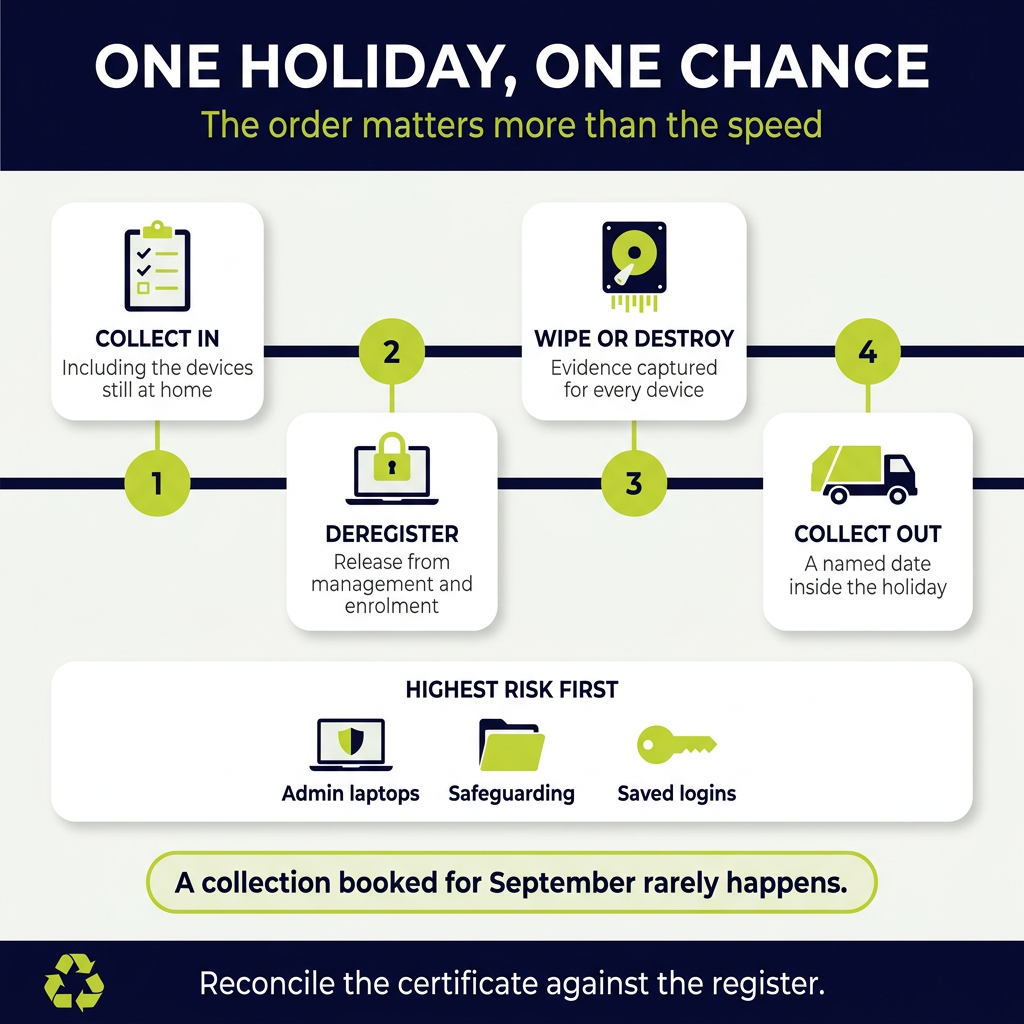
The refresh is a logistics problem, and the order matters more than the speed.
- Inventory the estate, including devices currently at home with pupils or staff.
- Decide what gets replaced, what gets redeployed and what leaves.
- Collect everything in, including the home devices, before the swap.
- Remove devices from the management platform as they come out of service.
- Wipe or arrange destruction, with evidence captured per device.
- Book the collection for a date inside the holiday, not after it.
- Reconcile the asset register against the certificate when it arrives.
Step three is the one that slips. A device still in a pupil’s bedroom in September is an open item nobody closes.
Send the request home twice, and name a return date. Once is never enough.
Wiping and destruction, and when each applies
Both are valid. The choice depends on what happens to the device next.
Devices going for reuse need certified wiping. A documented erasure process with a report per device, rather than a quick reinstall.
Devices headed for scrap can take physical destruction. Drives shredded, evidenced by serial number.
Failed and unbootable devices take destruction. A machine that will not start cannot take a wipe.
Encryption helps without being the whole answer. Key destruction is a reasonable control, and it still needs evidence.
Our guide to physical destruction versus wiping sets out where each fits.
Management platform deregistration
This is the step schools miss, and it causes problems months later.
Remove devices from mobile device management. Otherwise, they stay locked to your tenancy.
Release them from device enrolment programmes. An enrolled device is unusable by anyone else, which kills its resale value.
Deactivate the licences. So you are not paying for machines that left in August.
Update the MIS asset links. Where a device sits against a pupil or staff record.
A device long gone from the building but still enrolled is an asset register error and a wasted licence. Our IT asset management service handles this alongside the physical side.
Recovering value, honestly
Schools need this more than most, so it is worth being straight about what to expect.
Age drives everything. Three-year-old devices in reasonable condition have a market. Eight-year-old ones seldom do.
Condition matters more than spec. A cracked screen or a missing key drops a device into parts.
Chargers and cases add value. Send them with the devices rather than keeping a pile of orphan bricks.
Volume helps. Four hundred identical devices are worth more per unit than a mixed assortment.
Certified wiping is a precondition. No credible buyer takes an unwiped device.
Our IT recycling service assesses reuse value before anything goes for recovery.
What leaves alongside the laptops
A refresh clears out more than the fleet. Plan for all of it in one collection.
- Chargers, docks and trolley power supplies
- Interactive whiteboards and projectors from the same generation
- Old tablets, visualisers and classroom response systems
- Networking kit from the cupboard, including switches and access points
- Printers and copiers, which hold their own stored data
- Batteries from trolleys, UPS units and cordless devices
- Science and design technology equipment during a department refit
Batteries go down the battery route rather than with the general electricals.
Trolley packs are the ones to watch. They are large, they age badly, and they often sit forgotten in a cupboard.
Multi-academy trusts have an extra layer
A trust refreshing across sites hits problems a single school does not.
Schools joined at different times with different fleets. So the estate is rarely uniform.
Local arrangements persist. One school has a supplier nobody at the trust knows about.
Evidence sits in different places. Until a data protection question needs all of it at once.
Standards drift. One school wipes to a standard, another reinstalls and hopes.
Set one standard across the trust and run one collection contract. The evidence file is the reason, not the price.
Frequently asked questions
When should a school book its IT collection?
Inside the holiday, on a named date, arranged before the holiday starts. A collection booked in September rarely happens in September.
Old devices stacked in a corridor during term are both a data risk and a fire risk.
What happens to pupil data on old school laptops?
It needs certified erasure with evidence, or a destroyed drive. Wiping suits devices going for reuse, and destruction suits anything scrapped or unbootable.
Ask for a report or certificate per device by serial number.
Do school devices have real resale value?
Some do. Three-year-old devices in good condition with their chargers, in volume, have a market.
Older or damaged devices go for material recovery instead. Ask for an honest assessment before you plan a budget around it.
What about devices pupils have at home?
Collect them before the swap, not after. Home devices are the most common open item on a school asset register.
Chase them during the last week of term rather than in the holiday.
Do we have to remove devices from our management platform?
Yes. A device still enrolled stays locked to your tenancy. Nobody else can use it, and the resale value goes.
You will also keep paying licences for machines that left months ago.
Which school device carries the most risk?
An admin or leadership laptop, more often than a pupil device. Those machines hold HR files, safeguarding material and saved credentials.
Handle them first, apart from the trolley fleet.
How should a trust handle several schools at once?
Set one standard across the trust, run one collection contract, and keep the evidence in one place.
The reason is the audit file rather than the unit price. Scattered evidence is what fails a data protection review.
The bottom line
A school refresh is a one-week job with a nine-month tail if the old fleet does not leave on time.
Collect everything in first, including the devices sitting in bedrooms.
Deregister from the management platform as machines come out of service. Otherwise, you keep paying, and nobody else can use them.
Then book the collection for a date during the holiday. Reconcile the certificate against the asset register when it lands.
Priority WEEE collects and processes school and academy IT estates across the UK. Certified erasure or destruction, evidenced per device. Book a free waste review, and we will plan it around your holiday dates.
