
Somebody left your business last spring. Their laptop is still in a spare room in Leeds.
Nobody chased it, and nobody knows if anyone wiped it. It may still hold a live sign in to your systems.
Home working has spread your IT estate across dozens of addresses. Getting it back takes a plan.
What sits in staff homes
Before home working, most kit lived in the office. Now it lives wherever your staff live.
Our earlier piece on changing work patterns looked at how this shifted the flow of business WEEE.
A typical home setup holds a laptop, one or two monitors and a docking station. Add a headset, a keyboard, a mouse and a company phone.
Some staff also have a printer, a router or a webcam. Each one is business property, and most of it is WEEE at the end of its life.
The laptop and phone hold data. The rest holds value, and all of it holds a disposal duty.
Start the return before the last day
Most lost kit goes missing in the final week. The leaver is busy, the manager is busy and IT hears about it late.
Make kit return part of the leaver checklist. HR should tell IT the moment you agree a leaving date.
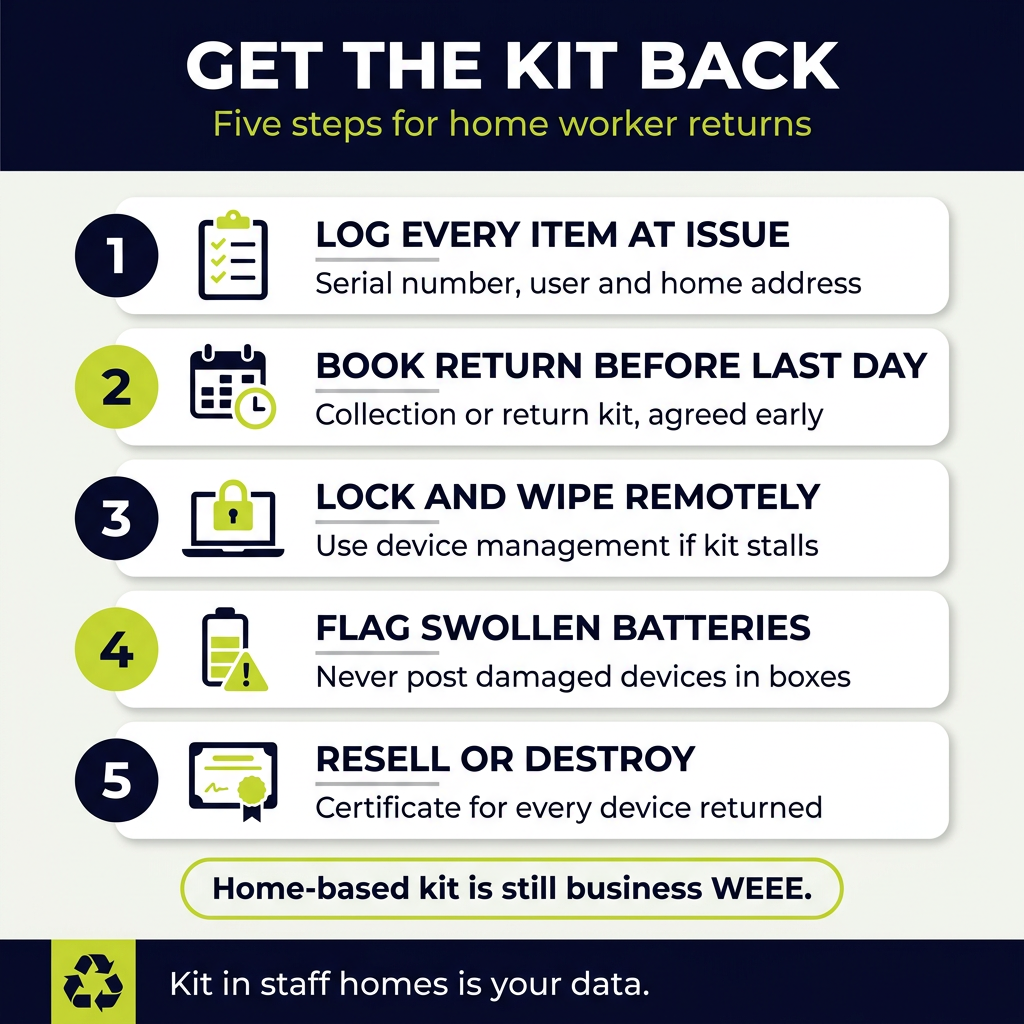
Book the collection or send the return kit before the last day. Aim for the kit to arrive back within a week of leaving.
Agree the list with the leaver in writing. They should know which items they need to return, and how.
Include chargers and power supplies on the list. They are cheap, but a laptop without its charger is harder to test and resell.
Do not wait for them to offer. People who have left have little reason to chase you.
Lock it remotely first
Most businesses manage laptops and phones through a device management platform. That is your first line of defence.
Lock the account on the leaver’s last day. Suspend their sign in, revoke tokens and remove access to shared drives.
If a device is not returned on time, lock it remotely. Most platforms can also trigger a remote wipe.
A remote wipe protects the data, but it is not proof of erasure. You still need a certified wipe or destruction once the device comes back.
Our guide to data wiping versus physical destruction explains the difference between the two routes.
The asset register does the heavy lifting
You cannot recover what you never recorded.
Log every item at issue. Note the serial number, the user, the home address and the issue date.
That includes the cheap kit. Docks, headsets and monitors rarely get logged, so they rarely come back.
Log every item again on return. Note its condition, whether IT removed the account and where it goes next.
Review the register every quarter. Chase any item still listed against someone who has left.
Our IT asset management service tracks laptops, phones and peripherals from issue to final disposal.
Collection or return kits?
There are two practical ways to get kit back from a home address.
Home collection. A courier or collector picks the kit up from the address on an agreed date. This suits monitors, docks and full desk setups.
Return kits. You send a padded box with a prepaid label, and the user posts the device back. This suits a single laptop or phone.
Either way, track every parcel. Match each serial number on the register against what arrives.
Ask staff not to wipe or reset devices themselves. An untrained reset can leave the account lock in place and wipe nothing useful.
The data risk of kit that never comes back
An unreturned laptop is not only a lost asset. It is a data breach waiting to happen.
It may hold customer records, emails, saved passwords and cached files. A phone may still receive security codes by text.
Under UK GDPR, you remain responsible for personal data on business devices. That duty does not end when the employee leaves.
If you cannot recover a device, lock it, wipe it remotely and record what happened. Take advice on whether the loss needs reporting to the Information Commissioner’s Office.
Once kit is back, send it for certified wiping or destruction. Our guide to data destruction standards covers what a proper certificate should list.
Damaged batteries in the post
Laptops and phones carry lithium batteries. Old ones can swell, especially in kit left charging on a desk for years.
A swollen battery is a fire risk in transit. Crushing or puncturing it can start a fire inside the parcel.
Ask staff to check for warning signs before packing. Look for a lifted screen, a bulging case or a trackpad that will not click.
Do not post a damaged device in a standard return kit. Most carriers restrict damaged lithium batteries, so arrange a specialist collection instead.
We supply fire-retardant battery containment for exactly this. Our guide to business battery fire risk covers safe storage on site.
Resale or destruction?
Once kit is back, each item needs a route.
Newer laptops, monitors and docks often have resale value. Refurbishment can offset part of the cost of the whole return process.
Older or damaged kit has little value. It goes for recycling, and any data-bearing parts go for destruction.
High-risk devices should go straight to destruction. That covers finance, HR and legal roles, or any drive that fails a verified wipe.
Our guide to IT asset recovery explains how refurbishment and resale work in practice.
Our data destruction service handles both wiping and shredding, with a certificate for each device.
Staff who were given old kit to keep
Some businesses let staff keep an old laptop or monitor. It feels generous, and it saves a collection.
It is also a common route for data to leave the business.
Wipe it first. Use certified wiping and keep the certificate before the device changes hands.
Log the transfer in the asset register. Record the serial number, the date and the person who now owns it.
Get the employee to sign that they accept ownership. From that point, it is their property and their disposal problem.
Without that record, an old laptop with your data on it is still yours on paper.
Your WEEE duty does not move house
Kit sitting in a staff home is still business-owned equipment. When it reaches the end of its life, it is business WEEE.
The Waste Electrical and Electronic Equipment Regulations 2013 cover it. Your duty of care under the Environmental Protection Act 1990 applies too.
That means it must go to a properly authorised route, with paperwork to prove it. It cannot go in a household bin or a council tip.
If staff dispose of kit themselves, the business may still carry the risk. Collect it properly, and keep the records.
If you are unsure what applies, check with the Environment Agency or your relevant regulator.
Frequently asked questions
Who is responsible for a laptop at a leaver’s home?
The business is, while it owns the device. That covers the data on it and its final disposal route.
Is a remote wipe enough?
It protects the data in the short term, but it is not proof of erasure. Follow it with a certified wipe or destruction once the device is back.
Can staff post laptops back themselves?
Yes, in a proper return kit with tracking. Damaged or swollen devices need a specialist collection instead.
What about monitors and docks?
They hold no personal data, but they are WEEE and often have resale value. Log them and recover them with the rest.
Can we let staff keep old kit?
Yes, if you wipe it first, keep the certificate and log the transfer. Get the employee to sign for it.
Does home-based kit still count as business WEEE?
Yes. If the business owns it, the business holds the disposal duty, wherever the kit sits.
The bottom line
Kit in staff homes is still your kit, your data and your waste.
Log every item at issue. Book the return before the last day, and lock devices remotely if they do not come back.
Then choose resale or destruction, and get a certificate for every device.
Priority WEEE collects business IT from offices and home workers across the UK. Certified data destruction and resale come as standard. Book a free waste review, and we will start with the kit still in staff homes.
