
Ask an IT manager to list the data-bearing devices in a building. You get laptops, servers, phones and maybe a few USB sticks.
Almost nobody says the copier.
Yet the device by the lift has spent four years storing an image of everything it scanned, copied and printed. And in eight weeks the lease ends, and somebody collects it.
What the device is actually keeping
A modern multifunction device is a computer with a printer bolted on. It behaves like one.
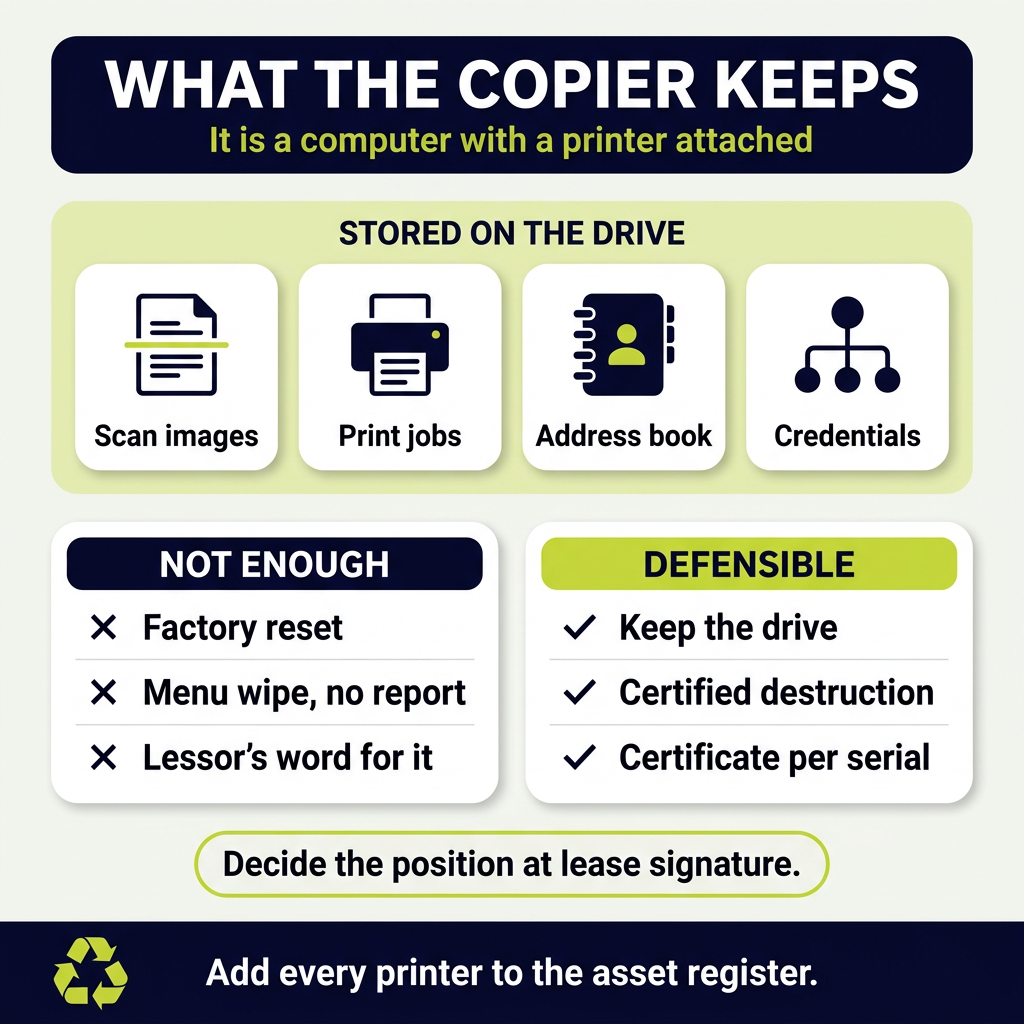
Scan and copy jobs go to disk. The device rasterises the page, stores it, then prints it. The stored image often stays.
Print queues hold documents. Secure release printing means jobs sit on the drive until somebody taps a card.
Address books hold personal data. Names, internal email addresses, scan-to-folder paths and sometimes credentials.
Fax logs and scan history persist. Many models keep the page images with them.
Network configuration sits there too. Server addresses, share paths and in some cases saved service account details.
That is a meaningful set of personal and commercial data sitting on a device nobody treats as a computer.
Which departments use them most
The risk concentrates in predictable places, and it is rarely the IT floor.
- HR, scanning contracts, disciplinary files and right to work documents
- Finance, copying invoices, bank details and payroll
- Legal and compliance, handling privileged material
- Clinical and care settings, scanning patient records
- Schools and colleges, copying safeguarding and pupil records
- Recruitment, handling identity documents
A device outside an HR office has a different risk profile from one in a warehouse. Rank them apart.
Why the lease return is the dangerous moment
Most photocopiers come on a lease. That changes who controls the device at end of life, and it is where this goes wrong.
The leasing company collects it. Your waste carrier never sees it, so your normal disposal process never applies.
It leaves as an asset, not as waste. Nobody classifies it, nobody raises a transfer note, and nobody thinks about the drive.
Many get refurbished and resold. The device goes to another business with whatever is still on it.
The lease contract seldom covers data. Read it. Most say nothing about sanitising storage.
Facilities book the collection, not IT. So the people who understand the drive never join the conversation.
By the time anyone asks, the device is on a lorry.
What to do before it leaves the building
Four options, and the right one depends on the device and the contract.
Remove and retain the drive. The most defensible option. You keep the disk, destroy it yourself, and the device leaves without it.
Check whether the lease allows that before you plan around it.
Have it sanitised on site and evidenced. Many devices have a built-in overwrite function. Only useful if you can evidence it ran and what standard it met.
Have the drive removed and destroyed by a specialist. Document removal and destruction with a certificate; device returned intact.
Get a written undertaking from the lessor. Weakest option. It transfers responsibility on paper only, and the duty stays with you.
Whichever you choose, decide it at lease signature rather than eight weeks before collection.
The factory reset problem
This is the assumption that causes most of the exposure.
A factory reset restores settings. It does not erase stored image data in any dependable way.
Menu wording misleads. “Clear all data” on one model means something quite different on another.
Overwrite functions vary by model and firmware. Some are thorough, some cost extra, and some sit switched off by default.
Nothing produces evidence on its own. A reset with no report proves nothing to a regulator or a client auditor.
Our guide to physical destruction versus data wiping sets out when each is appropriate.
Where the regulator sits on this
The obligation is the same one that applies to a laptop, and the device type is no defence.
UK GDPR applies to personal data wherever it rests. A scanned contract on a printer drive is personal data.
You remain the controller. Handing the device to a lessor does not transfer that.
You must be able to evidence disposal. Which means records naming the device and what happened to its storage.
The device is also WEEE at the true end of life. A machine headed for scrap rather than return needs the WEEE route with the correct documentation.
Ask any provider for their accreditations before handing over anything data-bearing.
Building it into the asset register
The underlying failure is that printers are not on the list of computers. Fix that once, and the problem stops recurring.
Add every MFD to the asset register. With model, serial, location and whether it holds storage.
Record the storage type. Hard disk, solid state or none. Some entry-level devices hold no drive at all.
Flag the high-risk locations. HR, finance, clinical and safeguarding areas.
Add end of lease to the IT calendar, not just procurement’s. Ninety days out, so there is time to act on it.
Include them in the annual data audit. Alongside laptops and servers rather than as an afterthought.
Our IT asset management service tracks these devices in the same register as the rest of the estate.
One register beats three. A device that sits only on a facilities list will go out through a facilities process.
The devices people forget alongside the printer
Once you accept that printers store data, a few others follow.
Scanners with scan-to-folder or scan-to-email. Same behaviour, smaller footprint.
Networked whiteboards and meeting room displays. Many cache files and hold account credentials.
Franking machines and postal systems. They hold address books and account data.
Door entry and CCTV recorders. Footage is personal data, and the recorder is WEEE.
Vehicle telematics and dashcams. Fleet devices store location history.
Each one is a small job. Missing them all is how an audit finding gets written.
Run the list once a year. The estate changes, and new device types keep arriving with storage in them.
Frequently asked questions
Do office printers really store copies of documents?
Most multifunction devices do. They rasterise a page to an internal drive before printing it. Secure release printing then holds jobs on disk until somebody collects them.
Address books, scan history and network settings are stored as well.
Does a factory reset wipe a photocopier?
Not dependably. A reset restores settings, and menu wording varies a great deal between manufacturers and firmware versions.
Even where an overwrite function exists, it rarely produces the evidence an auditor will ask for.
Who is responsible when a leased copier is collected?
You are, as the data controller. Handing the device to a leasing company does not transfer your obligation under UK GDPR.
Most lease contracts say nothing about sanitising storage, so check yours and agree the position in writing.
Can we keep the hard drive when the lease ends?
Often yes, and it is the most defensible option. Some agreements allow drive retention, sometimes for a fee.
Agree it at signature rather than discovering the position weeks before collection.
What evidence should we hold afterwards?
A record naming the device by model and serial, what happened to its storage, when, and who did it.
A certificate of destruction covering the specific drive is stronger than a general statement about a collection.
Which printers are the priority?
The ones outside HR, finance, legal, clinical and safeguarding areas. Those devices handle the most sensitive material.
A device in a warehouse office carries a different risk and can sit lower down the list.
The bottom line
The photocopier is a computer, and it has kept an image of everything sensitive your organisation has scanned.
Put every device on the asset register with its storage type recorded.
Decide the end-of-lease position at signature, not eight weeks before the lorry arrives.
Then get a certificate naming the drive, because a reset with no evidence proves nothing to anybody.
Priority WEEE removes and destroys data-bearing storage from printers, copiers and office equipment across the UK. Every device gets its own certificate. Book a free waste review, and we will start with the machines outside HR.
